


Nose Job - Plastic Surgery AI
4.24.00 Reviews
App Specs
- Version
- 1.3.5
- Updated On
- License
- Free
- Downloads
- 10,000+
- Developer
- ALICAN TILKI
- Categories
- Beauty
- Platform
- Android
Screenshots
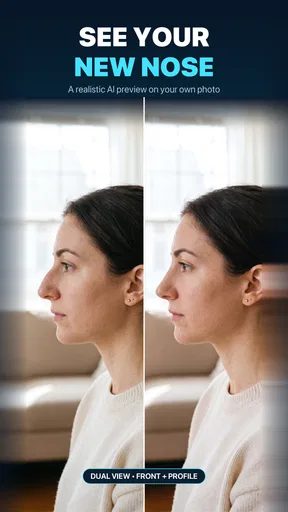
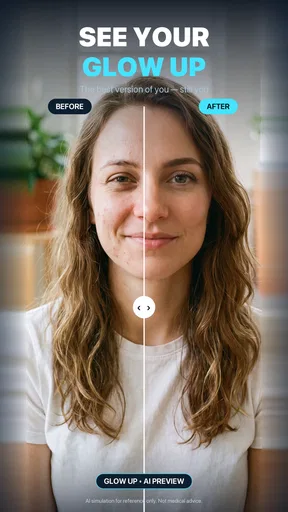
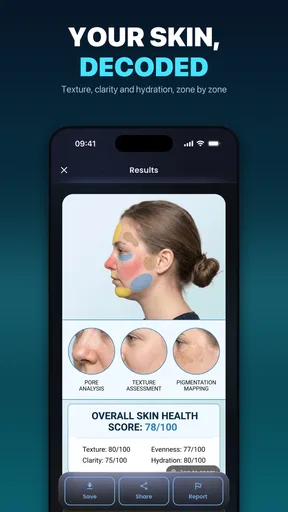
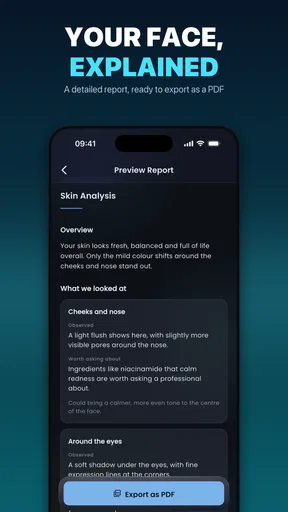
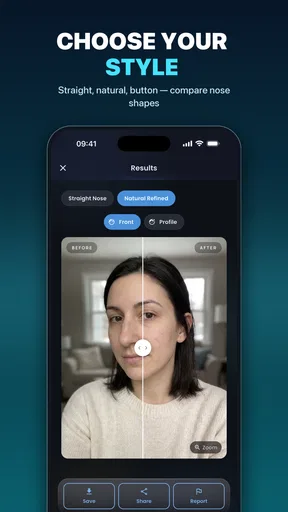
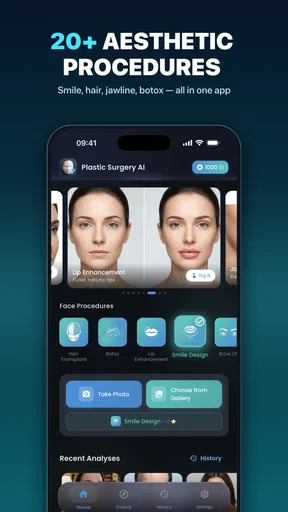
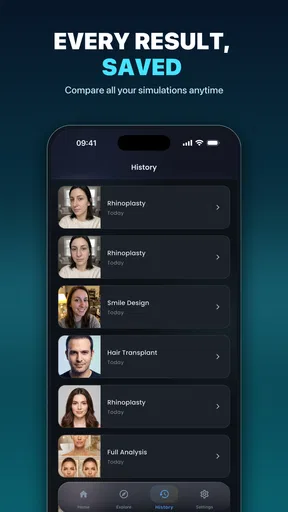
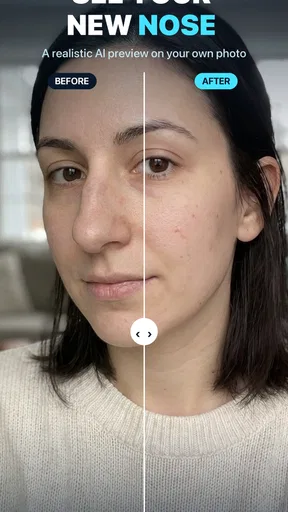
 Analysis by AppCompare
I tried Nose Job - Plastic Surgery AI as a beauty app for one simple reason: I wanted to see whether an AI face editor could make rhinoplasty ideas easier to understand without turning the process into a misleading makeover game. My overall impression is that it is most useful as a visual conversation starter. It can help you explore how changes to the nose, lips, or jawline might alter the balance of a face, but I would never treat its results as a medical preview or a substitute for advice from a qualified surgeon.
The app is made by ALICAN TILKI and is available for free, with optional purchases ranging from $9.99 to $99.99 per item. Its audience is broad because the content rating is Everyone, and the current release is version 1.3.4 for devices running Android 7.0 or later. Those details make it accessible to many people with older phones, although the quality of an AI edit can still depend heavily on the original photo, lighting, and camera angle.
How the current experience works in practice
The main idea is straightforward: start with a face image, explore an altered nose, and then look at related adjustments such as fuller lips or a more defined jawline. I found the concept easier to understand when I treated each edit as a separate visual question rather than trying to redesign my whole face at once. For example, changing the nose first makes it easier to notice whether a later jawline adjustment genuinely improves the overall balance or simply makes the image look more dramatic.
That order matters more than it may seem. Facial editing apps often encourage users to chase a polished result immediately, but a strong effect can hide whether the proportions look believable. My preferred workflow was to make a restrained change, inspect the face from a little distance, and then compare it with the original. A side-by-side check is especially important because the edited version can feel attractive simply because it is new.
The app’s focus on rhinoplasty makes it more specific than a typical selfie editor. Many beauty tools concentrate on skin smoothing, eye enlargement, makeup, or general reshaping. Here, the central question is how a nose alteration affects the rest of the face. That makes it relevant to someone researching cosmetic surgery, but also to a curious user who wants to understand facial proportions without committing to a real-world procedure.
The most useful way to read an AI preview is as a discussion aid, not a promise. A generated image cannot reproduce swelling, healing, skin thickness, breathing considerations, surgical technique, or the way a face moves. It also cannot tell you whether a proposed change is medically suitable. I would save an edit only as a reference for explaining a preference, never as evidence that a particular outcome is guaranteed.
Testing the face in small, controlled steps
One practical technique is to keep the first edit conservative. A slight adjustment can reveal whether the feature you notice in the mirror is actually the feature affecting the face’s balance. If the result already looks more harmonious, there is less reason to push the slider or effect further. When an edit becomes extreme, it may be showing the limits of the visual effect rather than a realistic possibility.
Worth Reading Before You Choose

EA SPORTS FC Mobile 26 Is a Bigger Football Game, but It Takes Time

Flipboard Shows What News Apps Must Do Beyond the Feed

Switching to Android Auto Means Rethinking Your Driving Routine

Google Calendar Makes a Crowded Week Easier to Manage

Ludo King Makes the Most of the Minutes Between Plans

Baby Panda World Brings Quick Play to Modern Phones, but Its Game Library Feels Busy
I also recommend using a clear, front-facing photo before experimenting with more expressive images. Hair crossing the face, strong shadows, sunglasses, heavy filters, or an unusual camera angle can make the AI interpret facial boundaries poorly. If the result looks strangely warped, I would retake the photo instead of assuming the app has discovered something meaningful about the face.
A second useful workflow is to create a small set of variations rather than one “perfect” version. Keep the original, a subtle edit, and a stronger edit. Looking at them later helps separate a genuine preference from the excitement of seeing a new image. This is particularly helpful when discussing ideas with a partner, family member, or clinician, because it gives you clearer language than saying only that you want your nose to look “better.”
Where the lips and jawline tools fit
The additional face-editing areas make sense because the nose does not exist in isolation. A narrower-looking nose, fuller lips, or a sharper jawline can change the perceived proportions of the entire face. I liked having the option to examine those relationships in one place instead of switching between separate apps with different editing styles.
Still, combining several changes at once creates a major interpretive problem. If the nose, lips, and jawline are all altered, it becomes difficult to know which adjustment created the improvement—or the distortion. For a more useful result, I would change one area, return to the original, and then add another adjustment only if there is a clear reason. This is slower than applying a complete makeover, but it produces a more honest comparison.
There is also a social use case here. Someone considering a consultation may struggle to describe whether they are concerned about the bridge, the tip, the width, or the relationship between the nose and chin. A carefully prepared set of images can help start that conversation. The important boundary is to present them as examples of direction, not as instructions or expected surgical outcomes.
What the latest release means for people using it now
The app’s current version is 1.3.4, and it was released on January 2, 2026. I see that as a useful signpost for readers deciding whether to try it today: the review applies to the current listed release rather than an older build. At the same time, a version number alone does not tell me that every AI result will be consistent across phones, photos, or faces, so I would judge the experience through a few careful tests before relying on it.
For someone already using an earlier release, the practical question is whether the present build fits their workflow. The best way to evaluate that is not by making a single dramatic edit. Try the same type of portrait in different lighting, compare a restrained result with a stronger one, and check whether the app remains useful when the photo is less than ideal. If the output changes significantly from one image to another, that is a reason to use it cautiously rather than a reason to keep adjusting until the result looks convincing.
The app has an average rating of 4.2 from around 135 ratings, while its listing shows just a handful of written reviews. I read that combination as modestly encouraging but not definitive. A numerical score can indicate that many people found the app worthwhile, yet a small pool of written feedback gives a limited picture of how it behaves in difficult cases, how users feel about the purchase options, or how well it serves someone with a serious consultation in mind.
Its reach is also still relatively focused, with over 10 thousand installs. That does not make the app unimportant, but it does mean I would not compare it with the accumulated reputation of a long-established photo editor. The current audience seems better described as curious early users and people looking for a specialized visual tool than as a huge mainstream community with extensive shared guidance.
What existing users should do before trusting an edit
If you have already made several images, I would revisit them with a practical checklist. First, compare them with the unedited photo at the same size. Second, inspect the edges around the nose, cheeks, lips, and jaw for signs that the surrounding face has been pulled along with the target feature. Third, look at the result in ordinary lighting rather than only in the flattering context where you created it.
Another worthwhile habit is to avoid using an edited image as a profile picture or public announcement while you are still deciding what you think. Friends may react to the overall polish rather than the specific change, and that can make the feedback less useful. Keep the image private until you have considered whether the effect still appeals to you after the novelty fades.
Because the app is free to download but includes in-app purchases, I would also check what is available before starting a serious editing session. A user who only wants a quick experiment may be perfectly happy with the free portion, while someone planning to create many variations should understand that continued use may involve paid items. The listed purchase range reaches from $9.99 to $99.99 per item, so I would avoid tapping through any purchase screen casually.
Where the experience still falls short
The biggest limitation is the distance between a flat AI image and a real medical result. Rhinoplasty is not only about appearance. A surgeon has to consider breathing, tissue, structure, healing, and the limits of a particular face. None of those questions can be settled by an attractive preview. Even if the edit looks natural, it may represent a change that is technically unsuitable or impossible to reproduce.
There is a second limitation in the psychology of face editing. Once I saw a more symmetrical or stylized version, the original could suddenly seem less appealing, even though nothing about my actual face had changed. That effect is easy to underestimate. I would take breaks between edits and avoid using the app when feeling pressured, upset, or fixated on a perceived flaw.
The app may also be a poor fit for users who want a complete beauty suite. Its identity is centered on nose-job visualization and related facial reshaping, not on being an all-purpose editor for makeup, hair, background replacement, or social-media design. A broader photo editor will probably be better if your goal is to prepare polished posts rather than explore a specific cosmetic question.
It is not the right choice for anyone expecting a consultation, diagnosis, or personalized surgical recommendation. It is also not ideal for a user who wants precise measurements. Visual resemblance is not the same as anatomical accuracy, and a slider-based result should not be treated as a specification to hand to a clinic.
Comparing it with ordinary beauty editors
Compared with a standard selfie editor, this app has a clearer purpose. General beauty tools are often better for quick smoothing and broad appearance changes, but they can make a nose alteration feel like just another filter. The specialized focus here encourages a more deliberate question: how does this one feature affect the face?
On the other hand, a conventional editor may offer more control over the final image and more familiar options for undoing, retouching, or preparing a photo. If you are already comfortable with manual editing, you may prefer the precision of adjusting an image yourself. The trade-off is that manual editing requires more skill and can be less approachable for someone who wants a quick visual starting point.
A consultation with a qualified professional remains the stronger alternative when the decision is real and immediate. That route costs more time and may involve fees, but it addresses questions an AI preview cannot answer. I would use this app before a consultation to organize thoughts, then use the consultation to test those thoughts against medical reality.
Who will get the most value from it
I think it suits three kinds of people particularly well. The first is someone casually curious about facial balance who wants to explore subtle possibilities without learning complex editing software. The second is a person preparing for an initial conversation about cosmetic treatment and looking for a clearer way to describe preferences. The third is a beauty-content creator who wants to demonstrate how different facial proportions can change the impression of a portrait, provided the result is labeled honestly as an edit.
It is less suitable for someone who is already anxious about appearance and tends to check images repeatedly. In that situation, an AI reshaping tool can encourage comparison rather than provide clarity. I would also steer away from it if your only goal is a polished selfie, because a mainstream editor may offer a faster and less emotionally loaded route.
What I would watch as the app develops
For future use, I would pay attention to how consistently the app handles different face angles, lighting conditions, and subtle adjustments. Those details matter more to me than increasingly dramatic transformations. A useful update would be one that makes restrained experimentation easier and helps users distinguish an illustrative edit from a realistic expectation.
I would also watch how the purchase structure affects ordinary use. Since optional items can be expensive, clarity around what a user can try before paying is important. A free starting point is welcome, but the experience should make it easy to understand when an action carries a charge before the user commits.
Finally, I would like to see the app remain careful about the line between beauty experimentation and medical expectation. The more convincing the images become, the more important that distinction is. Better-looking previews should lead to better questions, not stronger assumptions that surgery will produce the same face.
My final view is positive but measured. Nose Job - Plastic Surgery AI is a focused beauty app that can turn a vague cosmetic idea into something visual and easier to discuss. I appreciate its emphasis on the nose while still letting me consider lips and jawline in relation to the whole face. I would recommend it to a curious user who can treat the results as sketches and who is willing to compare subtle variations rather than chase a perfect transformation.
I would not recommend making an important medical decision from its images alone. Used with restraint, it can help you prepare questions, notice how facial features interact, and decide whether a professional conversation is worth having. Used as a promise of a future appearance, it becomes misleading. For me, that boundary defines the app’s real value: it is a visual exploration tool, not a virtual surgeon.
Pros
- AI previews possible nose-shape changes in seconds.
- Simple interface suitable for quick
- casual experimentation.
- Useful for comparing several nose styles before a consultation.
- Photo-based results can help users explain preferences to a surgeon.
- Convenient mobile tool for private
- at-home exploration.
Cons
- Results may look unrealistic with poor lighting or unusual angles.
- AI previews cannot predict surgical outcomes or healing changes.
- Some features may require payment or contain advertising.
- Uploading facial photos may raise privacy and data-storage concerns.
- The app could encourage unrealistic expectations about cosmetic surgery.
FAQs for Nose Job - Plastic Surgery AI
What is Nose Job - Plastic Surgery AI, and how does it work?
Nose Job - Plastic Surgery AI is an image-editing app designed to simulate possible nose-shape changes using artificial intelligence and facial editing tools. After selecting or taking a photo, you can usually adjust features such as the nose size, bridge, tip, or overall profile. The result is a visual preview for entertainment and experimentation, not a medical assessment or guaranteed surgical outcome.
Can Nose Job - Plastic Surgery AI accurately show what I would look like after surgery?
The app can provide a useful visual approximation, but its result should not be treated as an accurate prediction of plastic-surgery results. Lighting, camera angle, facial expression, image quality, and the selected adjustments can significantly affect the preview. Real surgery depends on anatomy, skin structure, healing, and a surgeon’s technique, so always discuss expectations with a qualified medical professional.
Is Nose Job - Plastic Surgery AI free to download and use?
Availability of features may depend on the version of the app, your device, and the developer’s current pricing model. Some tools may be free, while advanced editing options, saved results, an ad-free experience, or additional filters could require in-app purchases or a subscription. Check the app-store listing carefully for trial terms, recurring charges, and cancellation instructions before confirming payment.
Is my photo safe when I use Nose Job - Plastic Surgery AI?
Before uploading personal photos, review the app’s privacy policy and the permissions requested on your Android or iOS device. Find out whether images are processed locally or sent to online servers, how long they are stored, and whether they may be used to improve the service. Avoid uploading sensitive photos, and only grant camera or photo-library access when it is necessary.
Can this app replace advice from a plastic surgeon or medical professional?
No. Nose Job - Plastic Surgery AI is primarily a visualization and entertainment tool, and it cannot diagnose breathing problems, evaluate facial anatomy, recommend a procedure, or determine whether surgery is safe for you. If you are seriously considering rhinoplasty, consult a board-certified or appropriately licensed plastic surgeon or otolaryngologist and use the app only to help communicate general aesthetic preferences.


